Agricultural Drone Instruction Manual
Empty and full Container weight calibration
Version 1.0

If the empty container is not zero, the empty container calibration shall be performed.
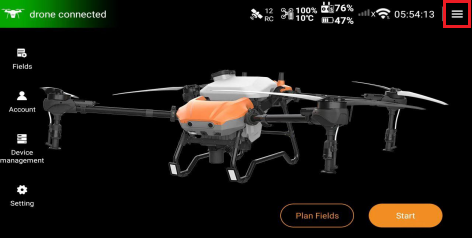
1. Enter the home page of Huida Drone APP, click the hamburger menu in the upper right corner to enter the next level.
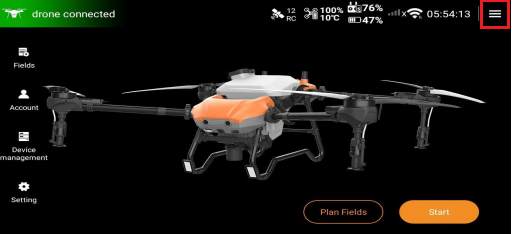
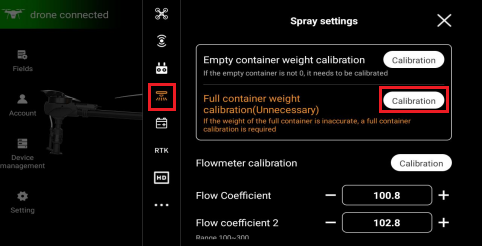
2. Find the "Spray Settings" interface, click the "Calibration" function option to the right of the empty container weight calibration to enter the calibration interface.
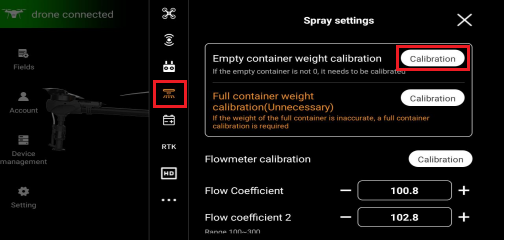
3. When calibrating the weight of the empty container, the agrochemical container or spreader should be emptied first to ensure that the main body of the agrochemical container or spreader is in full contact with all load sensors.
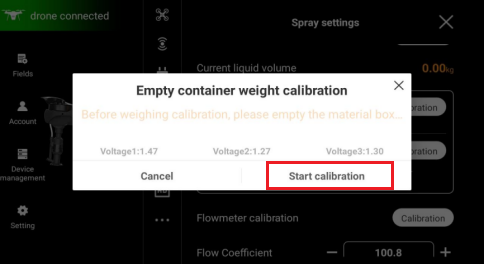
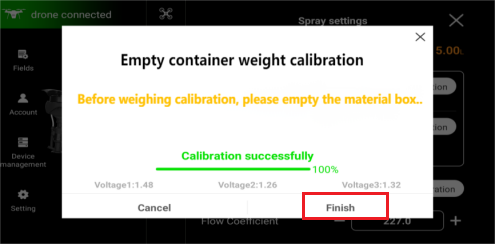
4. Click the "Start Calibration" function option until the calibration progress is 100% and the word "Calibration successfully" is prompted. Then click "Finish".
If the weight of the full container is not accurate, the full container calibration shall be performed.
1. Enter the home page of Huida Drone APP, and click the hamburger menu in the upper right corner to enter.
2. Find the "Spray Settings" interface, click the "Calibration" function option to the right of the full container weight calibration to enter.
3. Before weighing and calibrating the full container, please fill the agrochemical container first and record the total weight of the added agrochemical.
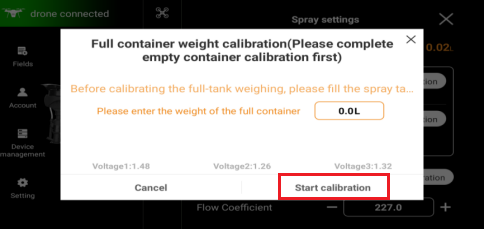
4. Enter the total weight value of the added agrochemical into the input box.
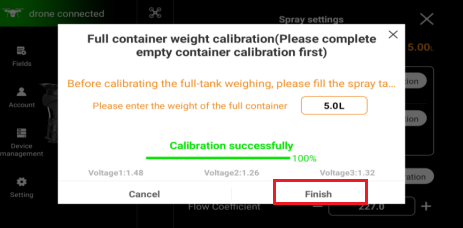
5. After entering the total weight value, click the "Start calibration" function option, wait until the calibration progress reaches 100% and "Calibration successfully" is displayed, then click "Finish".